Human-in-the-loop AI agents: where approval gates belong
Most agent demos add a human by putting a confirm button at the end. By then the agent has already sent the email or written the row. A useful approval gate sits inside the loop, right before the one step that changes the outside world.
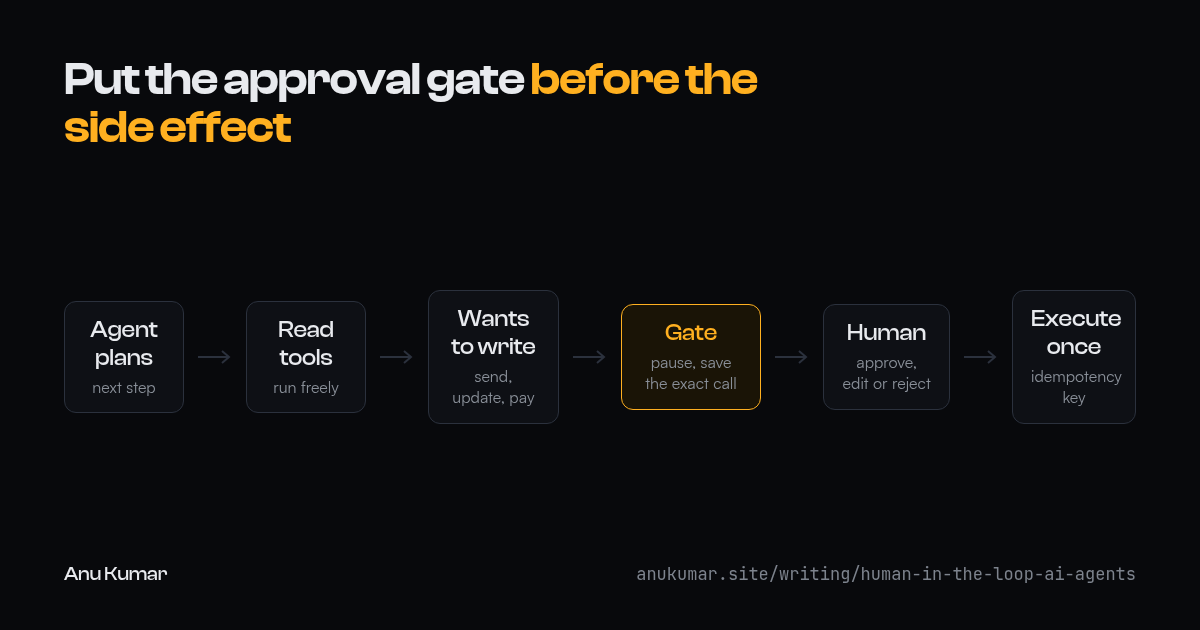
Gate side effects, not answers
An agent does two kinds of work. It reads: searches, retrieves documents, calls APIs that only return data. And it acts: sends messages, updates records, moves money, deletes things. Reading is cheap to get wrong because you can throw the result away. Acting isn't.
So the gate belongs on tools, not on the conversation. Let the agent plan and read freely. When it decides to call a tool that writes, stop, save the exact call it wants to make, and wait.
def call_tool(run, tool, args):
    if tool.writes and needs_approval(tool, args):
        request = save_pending(run.id, tool.name, args)
        run.pause(waiting_on=request.id)
        return  # resumes later from the saved request
    return tool.execute(args)
Not every write needs a person. Creating a draft is different from sending it. A useful split is reversible versus irreversible, and internal versus visible to a customer. An irreversible, customer-facing action always waits. A reversible, internal one usually doesn't.
What the reviewer has to see
"The agent wants to update a record. Approve?" gets approved every time, which makes it worthless. The reviewer needs enough to say no.
- The exact action and its arguments, shown as a diff against current state where possible. "Change the due date from 12 Nov to 3 Nov" beats a JSON blob.
- Why the agent wants to do it, in a sentence, with the sources it used. If a retrieved document drove the decision, link it.
- What happens if nobody answers. An approval request with no expiry turns into a stale action that fires weeks later.
Let the reviewer edit the arguments, not only approve or reject. Most corrections are small: a wrong date, one wrong recipient. Rejecting the whole action and rerunning the agent to fix one field wastes everyone's time.
Don't trust the model's confidence on its own
It's tempting to skip approval whenever the model says it's sure. A model asked to rate its own confidence will often give a high number for a wrong answer. Use signals you can check from outside the model instead.
- Did retrieval find anything relevant, or is the answer coming from the model's memory?
- Do the arguments pass validation: does the record exist, is the amount inside normal limits?
- Has this exact kind of action been approved unchanged many times before?
- Would running the step twice cause harm?
Combine those into a score if you like. The point is that every part of it can be verified without asking the model.
Resuming after a yes
Approval can arrive minutes or days later. By then the process that asked may be gone, the record may have changed, and the reviewer may click the button twice.
- Persist the pending call, not the agent's memory. Resume by executing the saved call, not by asking the model to redo its reasoning and hoping it lands on the same answer.
- Check the world again before executing. If the record changed since the request was made, ask again.
- Give every approved action an idempotency key, so a double click or a retry executes it once.
- Write an audit row with who approved what, when, and what actually ran. When something goes wrong later, that row is the first thing anyone asks for.
Watch for approval fatigue
A gate that fires fifty times a day gets clicked through without reading. That's worse than no gate, because it looks like oversight. Track how often each kind of request is approved unchanged. When that rate stays very high for a low-risk action, automate it and spend the human attention on the requests that actually get edited or rejected.
The goal isn't a person in every loop. It's a person on the few steps where a wrong action is expensive, with enough in front of them to catch it.
Last updated 2026-10-16. A markdown copy of this page is at /writing/human-in-the-loop-ai-agents.md, and agent guidance is at /llms.txt.